

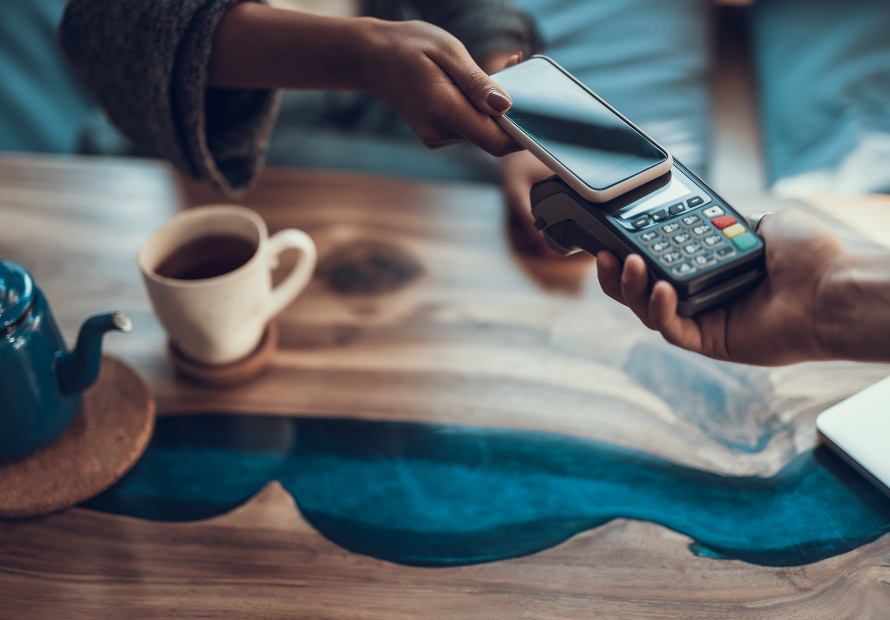
American consumers are increasingly turning to digital wallets and mobile payment apps for the security and convenience they offer, as more merchants are willing to accept them. A few years ago, “Venmo me” wasn’t a phrase. Now, we can tap our watches to buy coffee.
The benefits of contactless payments are speed, convenience, and security, but choosing between them can be overwhelming at times. We get these questions all the time: “Which app should I choose? Are they safe? Do I need more than one? How can I keep my account secure?” Fortunately, you don’t have to switch one of those megabanks to access these modern payment methods. Pendleton Community Bank has the tools you need, backed by the security you can trust.
If you’re thinking of using a payment app, you’re not alone. Mobile wallets and tap-to-pay methods have become so popular that 92% of American merchants now accept them, according to J.D. Power’s 2026 U.S. Merchant Services Satisfaction Study. Physical credit cards and debit cards are accepted by 96% of merchants, with digital wallets close behind them at 92% of merchants. Compare that to 78% of merchants that still accept cash, and it’s easy to see where this trend is heading. Physical checks are still accepted by just 57% of American small businesses.
Of course, digital wallets are also becoming more popular with American consumers. A 2024 survey by J.D. Power revealed that 48% of American consumers had used a digital wallet within the previous 90 days. This breaks down to 40% who used PayPal, 28% who used Apple Pay, 22% used Venmo, and 19% used Cash App Pay.
The "Tap to Pay" Revolution (Contactless)
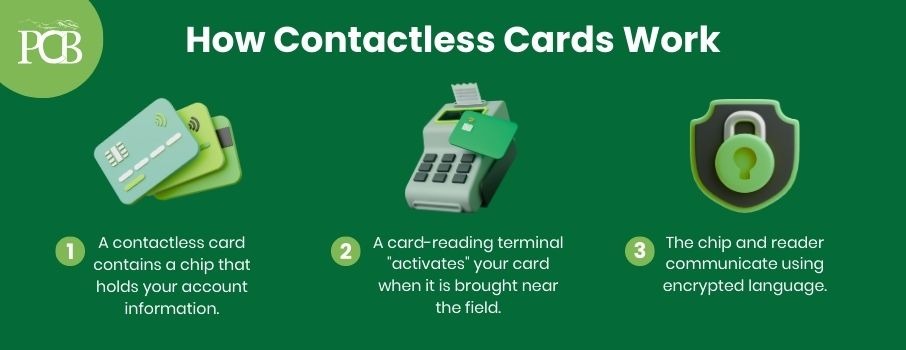
No doubt, you’ve seen the symbol on your card that looks like a sideways Wi-Fi icon. To many, it looks like a small radar or radio waves, but it actually stands for Near Field Communication (NFC). This technology allows your card and the payment terminal to communicate over short distances—sort of like a pair of secure walkie-talkies—letting you 'tap to pay' instantly.
The payment terminal (often called a card reader or POS) uses that same NFC technology to 'talk' to your smartphone or smartwatch. Instead of reading a physical chip, it communicates with a secure digital token stored on your device—allowing you to pay with a quick hover, exactly the same way you would with a contactless debit card.
There are many advantages to contactless payment methods and digital wallets, starting with the fact that you don’t need to fumble for cash or cards or press a keypad. Simply unlock your phone and hold it near the Contactless symbol on the terminal. It’s not only fast, it’s hygienic letting you pay without ever touching a germ-infested keypad. Of course, PCB Debit Cards are already contactless, and you don’t have to sign up for anything to use one to pay by tap.
It can also benefit your community as well. When you use a WVU Tech Affinity Debit Card, available from our bank, you can support current and future students who need a bit of financial help. When you use this card, 10% of the net interchange revenue and 10% of the ATM revenue at our on-campus ATM is automatically donated to the William ʻBillʼ Benn Student Success Fund.
Your Phone is Your Wallet (Digital Wallets)
Digital wallets like Apple Pay, Google Pay, and Samsung Pay securely store your card information right on your phone or smartwatch. When you’re ready to pay, there is usually no need to dig through menus to find an app. Simply double-click your side button (or wake your screen), verify with your face or fingerprint, and hold your device near the Contactless Symbol on the terminal. It’s the ultimate convenience: you can leave your physical wallet at home and still pay securely anywhere contactless is accepted.
One of the biggest advantages of digital wallets is security: merchants never actually receive your real account number. Through a process called tokenization, your wallet sends a unique, one-time digital code for each transaction. This means if a store’s system is ever hacked, thieves only get useless codes—not your real financial details.
It’s also safer physically. If you drop your plastic debit card, anyone can pick it up and use it. But if you lose your phone, your digital wallet remains locked behind your Face ID, fingerprint, or passcode—making it nearly impossible for a thief to access your money. Beyond payments, these wallets are becoming all-in-one organizers for boarding passes, event tickets.
How to Set up a Digital Wallet on Your Device
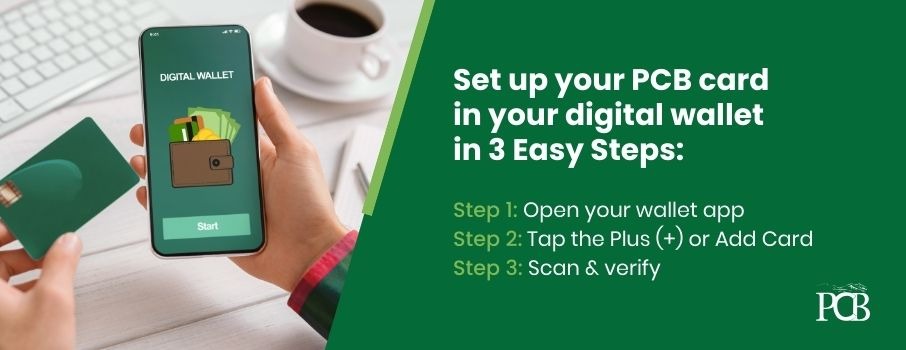
There are three easy steps to setting up a digital wallet on your phone or smart watch:
• Choose whichever digital wallet you intend to use and download it from the app store on your device, such as Apple’s App Store or Android Apps on Google Play. We recommend our own PCB Digital app, which is available for iPhone® and Android™ devices.
• Set up a PIN or password for your digital wallet. Even if you have security measures on your phone, such as a PIN or password, keeping both your phone and your digital wallet secure adds extra layers of protection.
• Add your payment information (credit card and/or debit card) to your digital wallet.
You Can Use a Digital Wallet as a Mobile ID in West Virginia!
West Virginia’s WVDMV EZ App allows you to keep a driver’s license, state ID, vehicle registration card, and proof of car insurance on your phone and use it just like your regular ID and insurance card. This digital ID is also accepted to get through a TSA checkpoint at more than 250 airports in the U.S., as long as it’s on an approved digital wallet such as the WVDMV EZ App, Apple Wallet, Google Wallet, Samsung Wallet, or another state-issued app.
Sending Money to Friends (P2P Payments)
With Person-to-Person (P2P) payments, you can quickly send money directly from your PCB account to someone else even if they use a different bank. Think of it as sending cash digitally: the money goes straight from your bank account into theirs within minutes.
We recommend Zelle because, unlike competitors like Venmo or Cash App, there is no 'middleman' holding your money. With other apps, funds often get stuck in a 'digital wallet,' forcing you to wait 1-3 days (or pay a fee) to transfer that cash into your actual bank account. With Zelle, the money lands directly in your account, available to use immediately—no waiting and no cash-out fees.
Watch Out for Payment App Scams!
The rising popularity and convenience of P2P apps make them a target for thieves. Common P2P scams involve a scammer who sends you a message out of the blue claiming they “accidentally” sent funds to you and ask you to send the money back. If the victim complies, they soon find out that they haven’t actually received any funds, and whatever they sent to the scammers is lost forever.
Another approach with P2P apps, and other types of scams, is to create a sense of urgency to get you to act without thinking and give them money or access to your accounts. A scammer might claim to represent your bank, payment app personnel, or law enforcement. They claim there’s something wrong with your account and ask you to tap on a link to update or change a password. They might claim you need to transfer funds to unlock your account or keep your money “safe.”
No one from PCB, law enforcement, or anyone else would ask you to transfer money this way. If someone makes this kind of request, please take the time to confirm it’s legit by contacting us. Tapping on a fraudulent link could give scammers access to your accounts or result in malware being installed on your device.
Another common scam involves bogus merchandise, such as tickets to concerts or sporting events. The victim sends a payment but never receives the item. You should treat Zelle exactly like cash: if you wouldn't mail a stack of $100 bills to a stranger you met online, don't send them a Zelle payment.
If a seller insists you pay via Zelle, that is a major red flag. Neither PCB nor Zelle offers purchase protection for these transactions. If the item never arrives or is different from what was advertised, the money is likely gone for good.
Managing It All (The PCB Digital App)
Our mobile banking app gives you full control over your accounts with the convenience of banking when you need it from your smartphone or mobile device. You can use it to manage your accounts, view your account balances and transactions, transfer funds, and send payments to businesses and other people using Zelle. With Mobile Check Deposit, you can deposit a check by taking a picture of it with your device. With card controls, you can instantly turn off your debit card if it’s lost, and we use encrypted software to keep your information safe, even if it’s lost or stolen.
Download the PCB Digital app to your smartphone or mobile device to get started:
The "Local Security" Advantage
One of the most common questions we hear regarding mobile payments is, “What if I get hacked?”
It is a valid fear. With many payment apps, running into a security issue means getting stuck in a loop with a chatbot. As a local bank serving West Virginia and the Shenandoah Valley, we offer a different experience. If you have a question about our app, you can call your local branch and speak with a real person—someone who likely lives in your own neighborhood.
We also frequently field questions like, “Is Apple Pay safe?” or “Is Venmo secure?”
While we cannot speak to the internal security measures of every third-party app, we can vouch for the safety of our own mobile banking app and its Zelle integration. We stand by these security features because we use them ourselves every day.
Pro Tip: For an extra layer of protection, we recommend setting up text alerts. By configuring an alert for transactions over a certain amount (such as $50), you can monitor your money in real-time and catch potential fraud the moment it happens.
Set up Your Own PCB Digital Wallet Today!
Ready to upgrade your wallet and learn how to add a debit card to your phone? Just download our app and discover how easy it is to link your accounts, the Zelle®️ payment app, and the WVU Tech Affinity Debit Card to make payments faster and safer with Pendleton Community Bank. Not sure if your card is digital-ready? Stop by your local PCB branch or download the PCB Digital app today to get started.